Veterinary clinic software from check-in to discharge
The pet arrives and joins the reception queue, the vet writes the exam, prescription and lab order, a vaccination schedules its next dose, and an inpatient's owner gets an update every day.
Coming soon — We are building this business's own tools now, and we do not want to hand you a dashboard that does not fit. Book a demo and we will set it up with you.
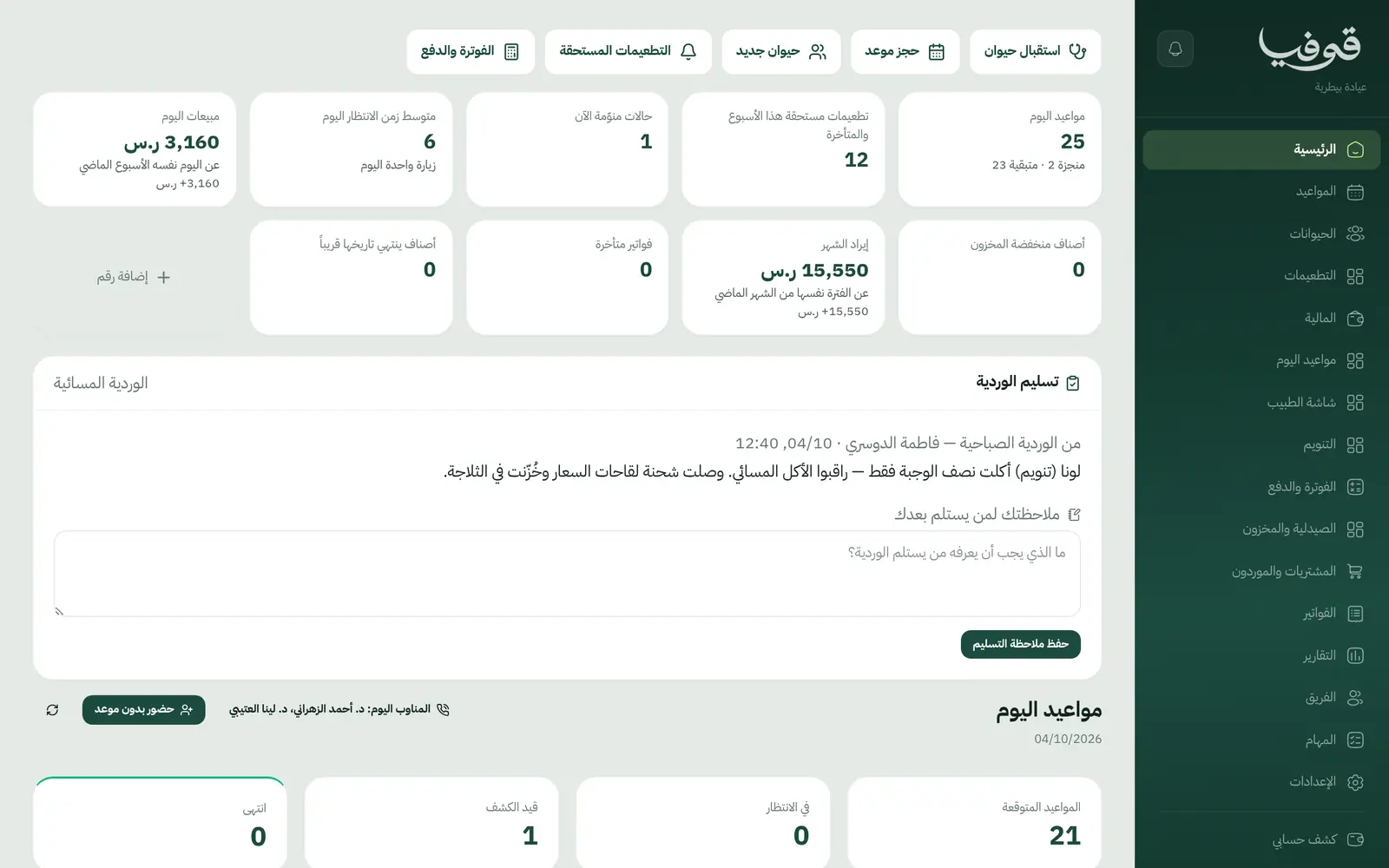
What wears an owner down every day
Vaccinations on a paper card
Owners lose the vaccination card, and the clinic does not know the next dose is due until it is late.
Owners calling every hour
The cat is staying overnight, the owner keeps asking how she is, and the vet answers between exams.
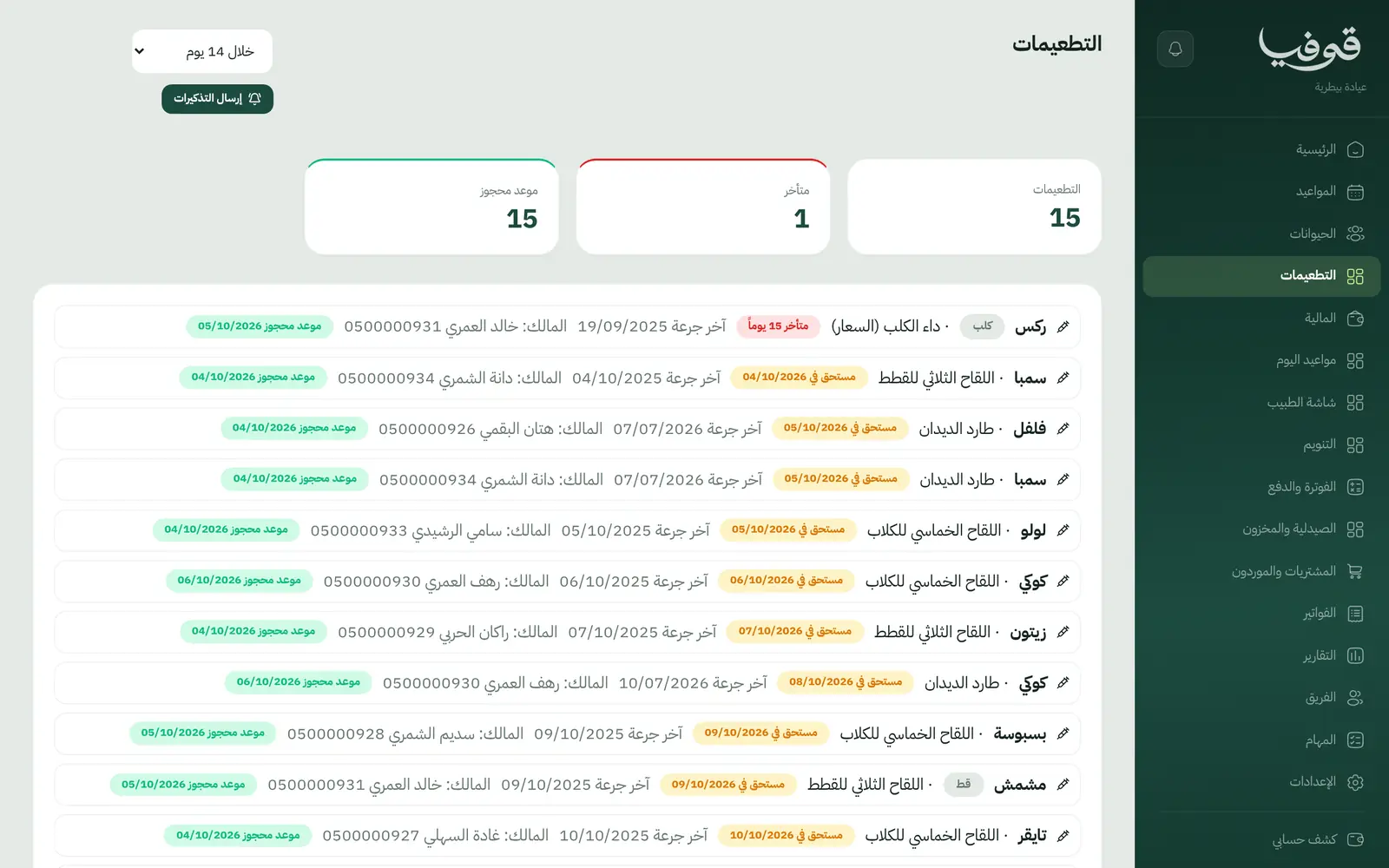
Medicines expiring on the shelf
The pharmacy is not tracked, and low stock is found when you need it.
What Govia gives you
A file per pet
Species, breed, sex, neutering, microchip number and weight at each visit, under one owner.
Vaccinations
Each dose logged with the next one's date, a due list, and an owner reminder per dose.
Reception queue
Steps from arrived and waiting, to in exam, to awaiting results, with wait times.
Doctor's screen
Exam notes, prescription and lab order on the pet's medical record.
Hospital stays
Cages night by night, a daily update published to the owner, and the nights added to the visit's invoice.
Pharmacy and stock
Medicines, vaccines and suppliers, with low-stock alerts.
Owner portal
The owner's mobile number opens the portal on all their pets, appointments and invoices.
Clinic documents
Health record, prescription, medical report, certificate, consent form, discharge report and tax invoice.
Inside the system
How your day runs on Govia
The pet arrives
Reception opens its file under the owner and adds it to the queue.
In the exam
Weight, notes, prescription and lab order.
Vaccine or stay
A vaccine schedules its next dose; a hospital stay books a cage and asks for a daily update.
Payment
One invoice covers the exam, medicines and nights, paid in cash, by card or mada.
Why Govia
Built for veterinary work
Pet, owner, vaccine and cage, not a generic patient.
Reminders bring owners back
The next dose reminds the owner of its date, without relying on a paper card.
Reassured owners
A daily update for each inpatient is published to the owner instead of repeated calls.
A controlled pharmacy
Stock and purchasing on the same screens you dispense from.
Arabic first, in your trade’s words
The whole system runs in Arabic, right to left, and names things the way your business does: client, patient, member or tenant.
Automatic WhatsApp messages
Booking confirmations, appointment reminders and verification codes reach your customers on WhatsApp without anyone typing them.
Local payments
Payment links with mada, Apple Pay and cards, plus instalments with Tabby and Tamara through Tap.
Tax invoices with QR
ZATCA-ready tax invoices with QR (generation phase), issued with every payment.
On Riyadh time
Appointments, reports and reminders run on Riyadh time and the Saudi working week, wherever the system is opened.
An assistant that answers and prepares
Ask it about your numbers and screens and it answers, then prepares the action for you to approve with one tap.
Questions before you start
Does it remind owners about vaccinations?
Yes. Each dose is logged with the next one's date, the owner is reminded, and the vaccinations list shows what is due.
Does it handle hospital stays?
Yes. A stay books a cage per night, the vet writes a daily update that is published to the owner, and the nights go on the invoice.
Can I track medicine stock?
Yes. Pharmacy and stock, and purchasing and suppliers, are in the menu, with low-stock alerts.
Are the invoices ZATCA compliant?
Yes. Invoices are ZATCA-ready tax invoices with QR (generation phase), issued automatically with every payment.
Does it work for more than one branch?
Yes. Add your locations and owners pick one before the time when they book. For branches with separate accounts, we link them into one group you switch between — contact us to set it up.
Does it need installing?
No. It runs in the browser on phone, tablet and computer, and can be added as an app from our install page with no app store. Updates arrive on their own.
Related businesses
Try Govia on your business
Book a demo and we will show you Govia on your business, and set it up with you when it launches.