Facilities management software: SLA contracts and work orders measured by the hour
Every O&M contract carries its SLA, every fault becomes a work order whose clock starts when it opens, preventive visits are generated from the contract, and the month's invoice deducts breach penalties.
Start your free trial Book a demo Pricing
What wears an owner down every day
The client measures response, you don't
The contract promises a response within hours, the client counts every delay, and you have no record.
PPM in a forgotten schedule
The generator's planned maintenance was due last month and nobody was reminded.
The monthly invoice is a dispute
Breach penalties are worked out by hand at month end and the client disputes the figure.
What Govia gives you
Contracts and SLAs
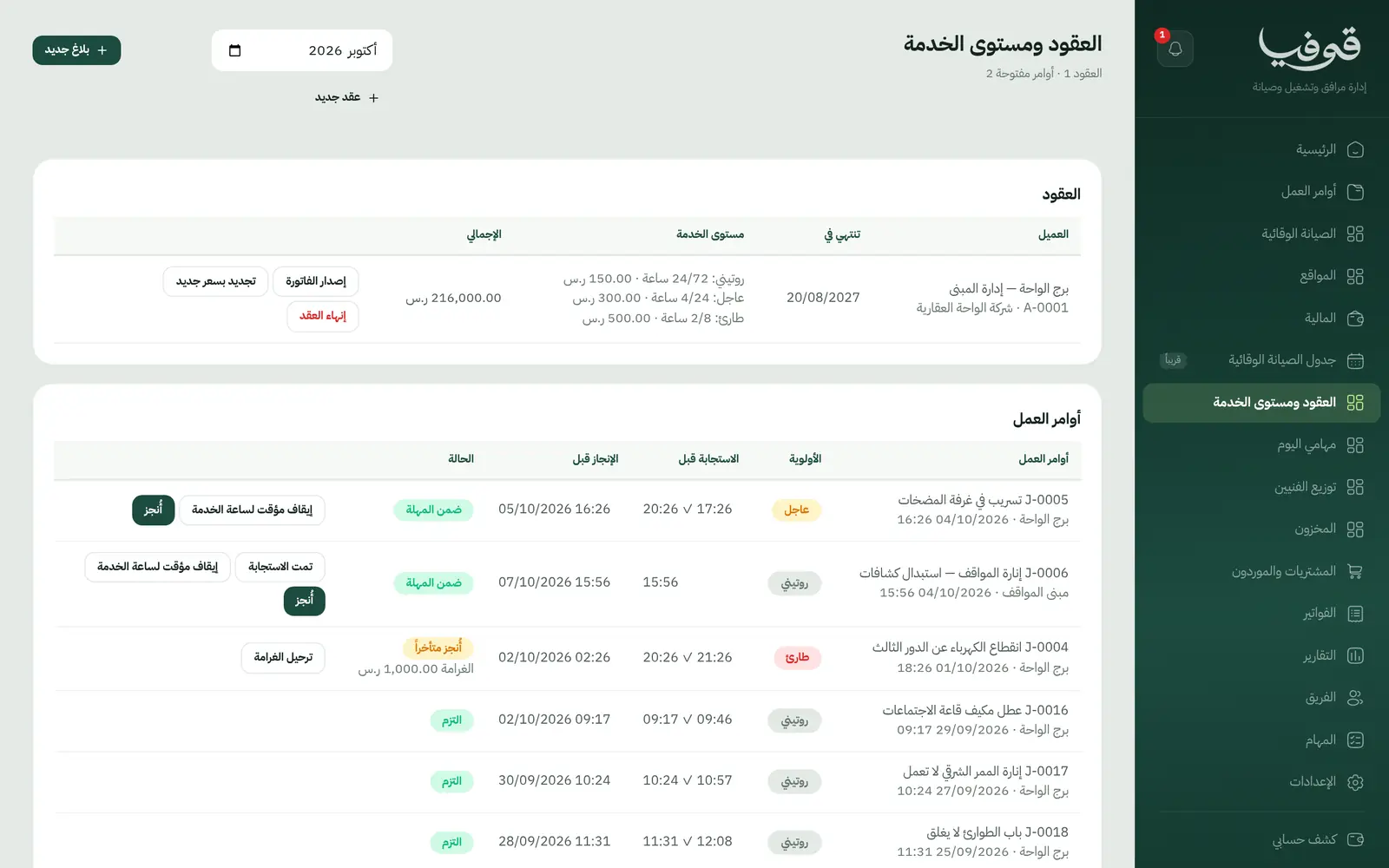
An O&M contract with a monthly fee, and for each priority the hours to respond, to resolve, and the penalty per breach.
Work orders on the clock
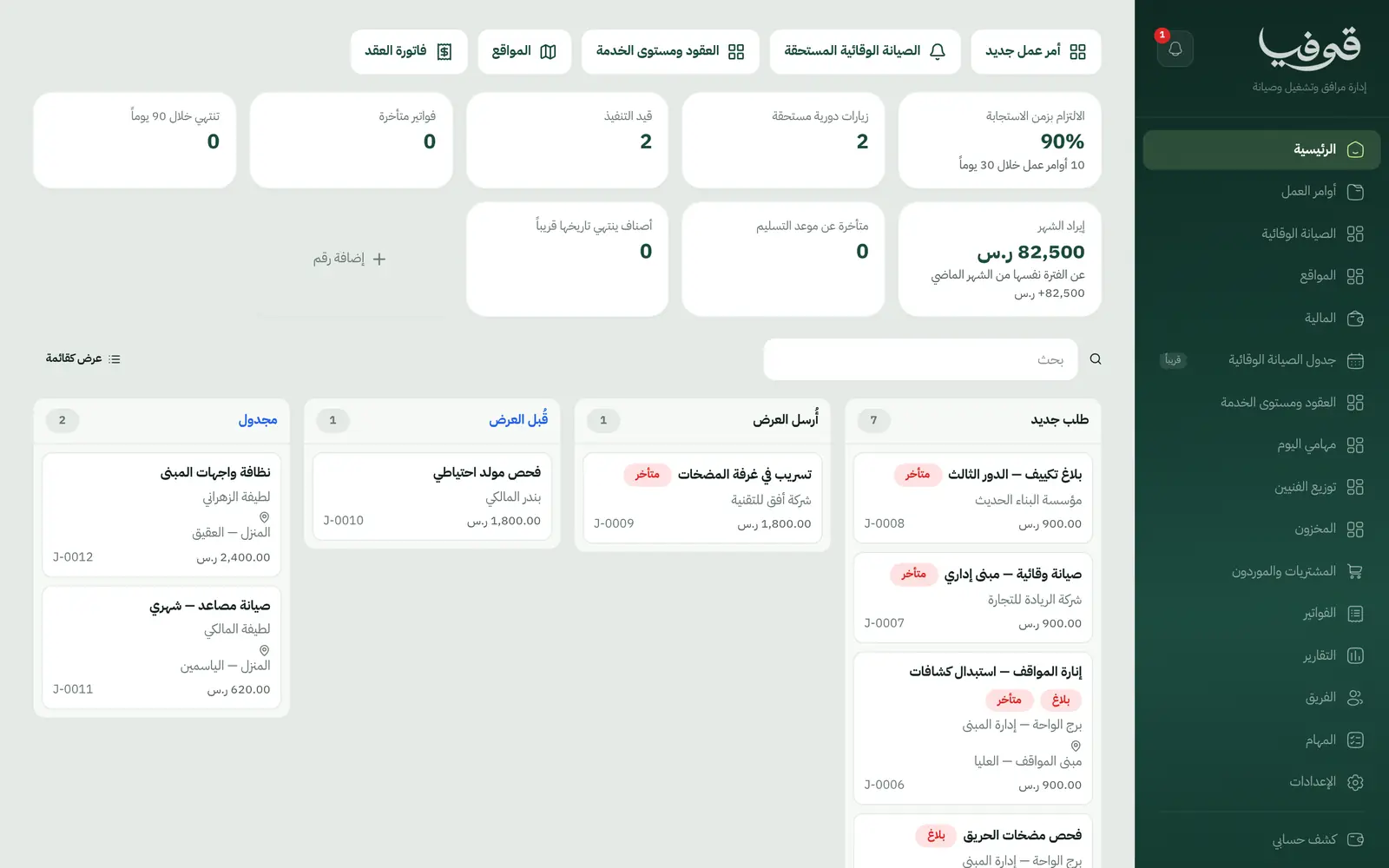
A fault becomes a prioritised work order whose clocks start on opening; arrival stamps the response.
Business hours and pauses
The SLA can run on working hours with emergencies round the clock, and the clock stops while waiting for the client's access.
Preventive maintenance
A plan on the contract every 1, 3, 6 or 12 months generates its visits once per due date, on the site and its assets.
Sites and assets
Client sites and assets by serial, each with a QR label that opens it in the app.
Technician day and dispatch
Technicians see their orders and press on-the-way to message the client; the office assigns orders to technicians.
Monthly contract invoice
One invoice per contract per month: the fee, plus a deduction line for each SLA breach.
Stock and purchasing
Spare parts and materials consumed on work orders, with purchasing and suppliers alongside.
Inside the system
How your day runs on Govia
The contract
Record the contract with its fee, SLA, preventive plan and sites.
Preventive visits
Planned visits appear on the preventive screen before they fall due, with overdue ones flagged.
The fault
A fault becomes a prioritised work order assigned to a notified technician; an emergency alerts management at once.
Month end
The contract invoice with its fee and breach deductions, computed from the work orders' own clocks.
Why Govia
Figures from the record
Response and resolution are stamped as they happen, so there is no argument over penalties.
Fair counting
Working hours and access pauses are counted exactly as the contract says.
PPM on schedule
The plan on the contract generates visits instead of relying on memory.
Compliance in view
Response-time compliance across all orders on the home screen.
Arabic first, in your trade’s words
The whole system runs in Arabic, right to left, and names things the way your business does: client, patient, member or tenant.
Automatic WhatsApp messages
Booking confirmations, appointment reminders and verification codes reach your customers on WhatsApp without anyone typing them.
Local payments
Payment links with mada, Apple Pay and cards, plus instalments with Tabby and Tamara through Tap.
Tax invoices with QR
ZATCA-ready tax invoices with QR (generation phase), issued with every payment.
On Riyadh time
Appointments, reports and reminders run on Riyadh time and the Saudi working week, wherever the system is opened.
An assistant that answers and prepares
Ask it about your numbers and screens and it answers, then prepares the action for you to approve with one tap.
Questions before you start
Does it need installing?
No. It runs in the browser, and technicians use their phone, scanning asset labels with its camera.
Is the monthly invoice automatic?
Each contract's monthly invoice is raised from its screen in one press, with the fee and computed breach deductions.
Does it notify the client?
Yes. An on-the-way WhatsApp message when the technician sets off, and an overdue-fee reminder you can switch on.
Are the invoices ZATCA compliant?
Govia issues ZATCA-ready electronic tax invoices with a QR code (generation phase).
Can clients pay with mada and Apple Pay?
Yes. With the payment gateway on, clients pay from the invoice link by mada, Apple Pay or card.
How long is the trial?
A free trial starts from the sign-up page; choose your plan afterwards on the pricing page.
Related businesses
Try Govia on your business
Sign up and start with a service menu and settings prepared for your trade, or book a demo and we will show you the system on your business.