Language institute software from placement test to certificate
Book a placement test and get a suggested level, enrol the student in a men’s or women’s group, morning or evening, track roll and grades, then move the passer up a level and issue the certificate.
Start your free trial Book a demo Pricing
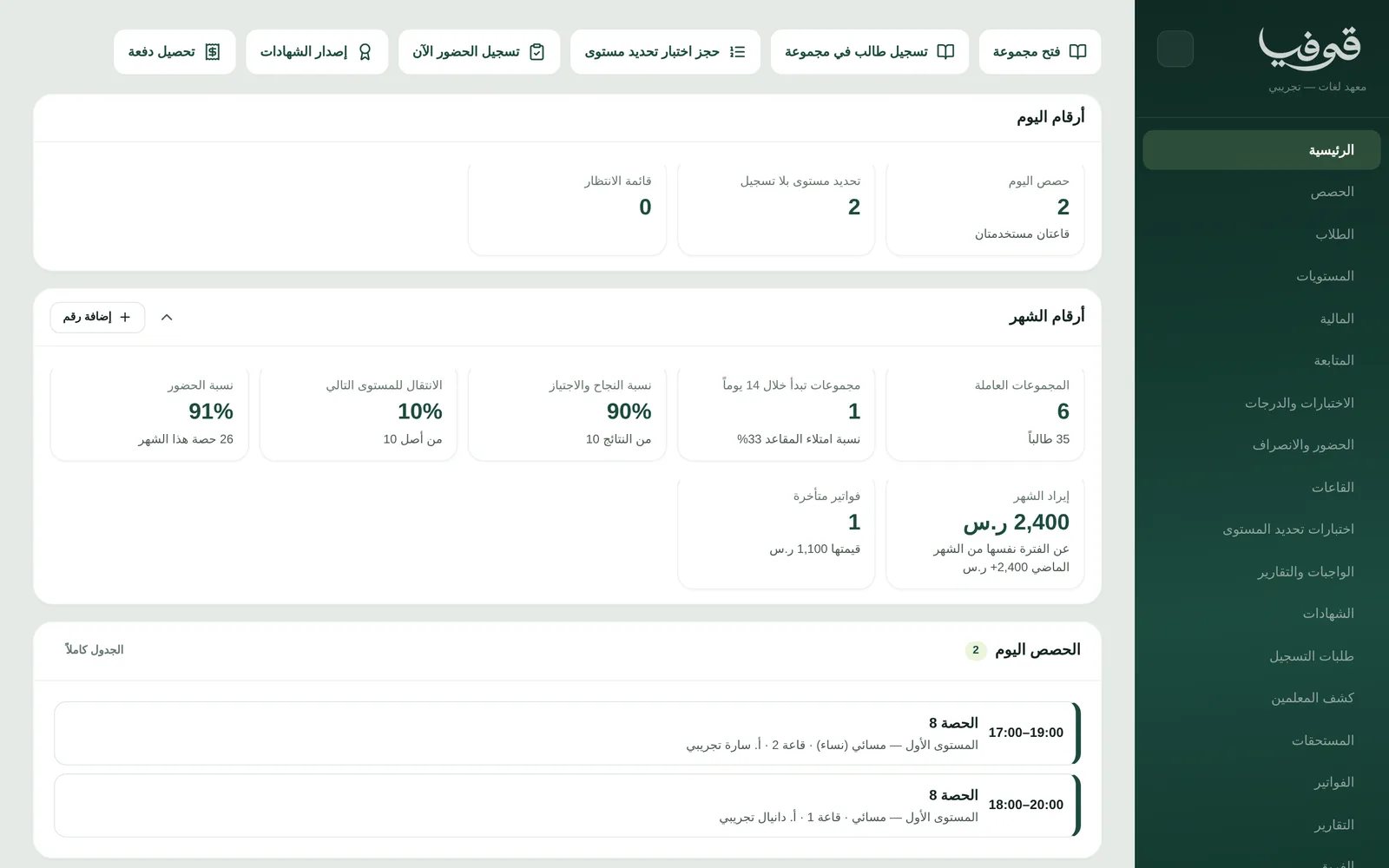
What wears an owner down every day
New students don’t know their level
They sit a paper test and wait for a call, may be enrolled in a level that doesn’t fit and struggle, get bored or drop out, and someone who tested but never enrolled gets lost in the paperwork.
Groups clash and the timetable is on paper
A men’s group and a women’s group, morning and evening, two rooms and one teacher across several groups, and nobody sees the clash until students arrive to a busy room.
Promotion and certificates by guesswork
Who passed the level? Who reached the attendance threshold? You gather scores from scattered files and type certificates one by one, and a misspelt English name means a new certificate.
What Govia gives you
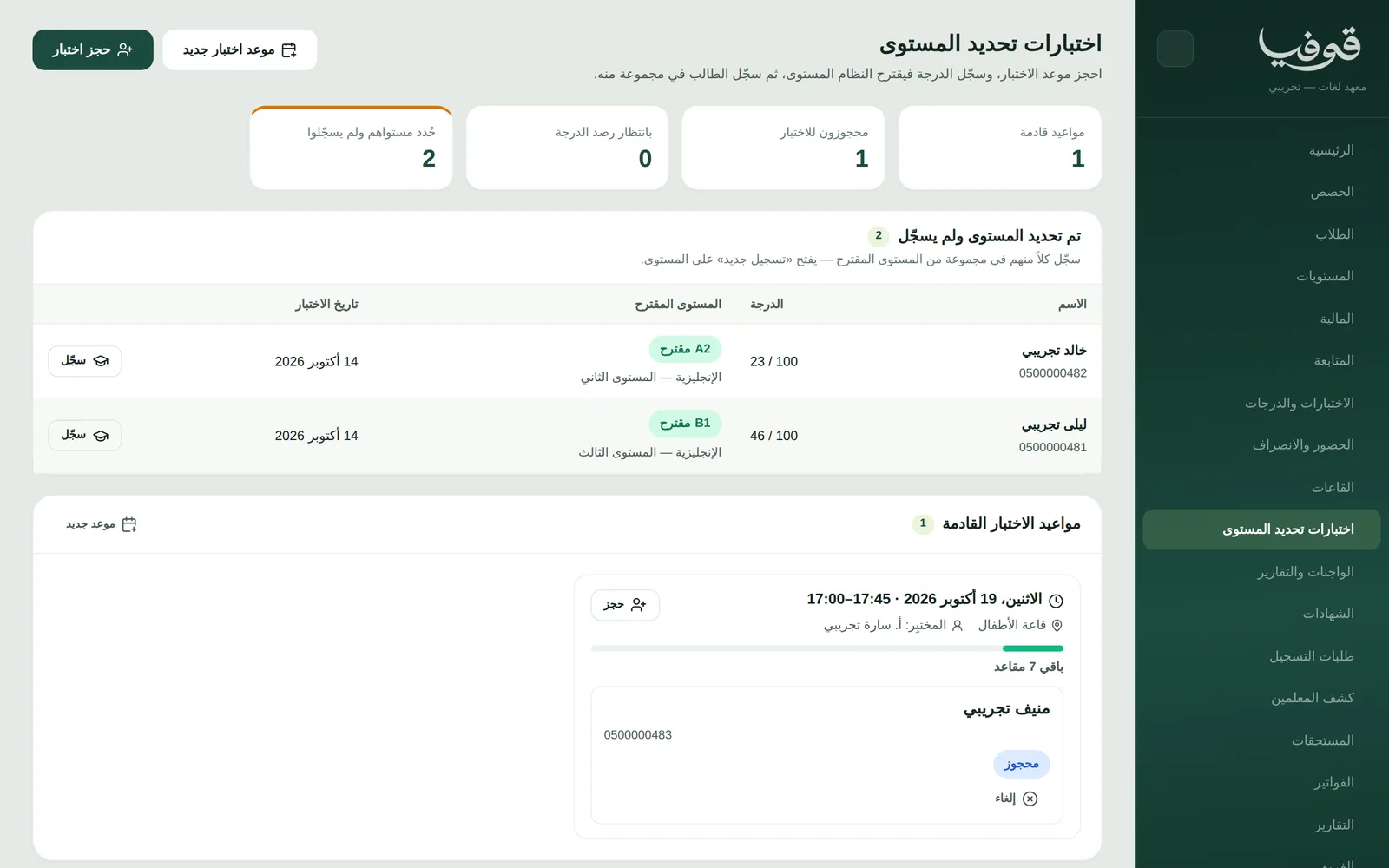
A placement test that suggests the level
Book the student into a test sitting with its seats, enter the score and the scale suggests the level (for example “A2 suggested”), then “enrol” opens registration on that level.
Levels and men’s and women’s groups
Each level has its hours, attendance threshold, pass mark and next level, and under it its groups: each with its gender, period, teacher, room, seats, a minimum to run and a waitlist when full.
Timetable and roll
The week on one grid by room, teacher or group, a clash refused before saving, and a cover for a teacher who is away. Roll is present, absent, late or excused, or by scanning the hall code in and out.
Grades and moving up a level
Assessment components with their weights (pre-test, quizzes, oral, post-test, final) take their scores and each student reads “passed” or “not passed”; “move to next level” places the passer in a group at the next level and tells them.
Certificates with a verification link
A bilingual certificate for those who met the attendance threshold and pass mark, with the English name as on the student’s file, a QR code and a verification link; issue to everyone eligible in one go and send over WhatsApp.
Student portal
Students sign in with their mobile number and a code, then see their level, timetable, attendance percentage, results, certificates with their verification link and invoices, and scan the hall code from the portal on arrival.
Invoices and online payment
A tax invoice with a deposit on confirmation and the balance the day before the group starts, payments taken at the desk, and once online payments are on, students pay from the portal or when they register on your public page.
Sponsoring employers
Link a student to their employer and it is recorded as the payer of their fees; give it a portal and it follows enrolment, attendance and certificates only, with no access to money or messages.
Inside the system
How your day runs on Govia
Placement test
Book the sitting from the desk or your public page, and enter the score afterwards so the scale suggests a level.
Enrol in a group
Enrol the student in a group at the suggested level, men or women, morning or evening, or let them enrol and pay from your page.
Study days
Mark roll in every lesson; students see their timetable and attendance in the portal, and anyone below the threshold shows in the student list.
End of the level
Scores are entered, the passer moves up a level, and a certificate goes to those who met attendance and pass mark.
Why Govia
The right level from day one
A test suggests and enrolment follows the suggestion, and anyone tested but not enrolled shows under “level set, not enrolled” so you know whom to call.
Groups that don’t clash
A busy room or teacher is refused by name before saving, and a group stays “below minimum” until enough students are in to run it.
Moving up without manual work
The passer is moved to the next level and told, whoever fails repeats the level, and attendance and results are the same figures on every screen.
Certificates that prove themselves
A verification link on every certificate saves you answering each party that asks whether it is genuine, and it shows whether it is valid or cancelled.
Arabic first, in your trade’s words
The whole system runs in Arabic, right to left, and names things the way your business does: client, patient, member or tenant.
Automatic WhatsApp messages
Booking confirmations, appointment reminders and verification codes reach your customers on WhatsApp without anyone typing them.
Local payments
Payment links with mada, Apple Pay and cards, plus instalments with Tabby and Tamara through Tap.
Tax invoices with QR
ZATCA-ready tax invoices with QR (generation phase), issued with every payment.
On Riyadh time
Appointments, reports and reminders run on Riyadh time and the Saudi working week, wherever the system is opened.
An assistant that answers and prepares
Ask it about your numbers and screens and it answers, then prepares the action for you to approve with one tap.
Questions before you start
Does it suggest a student’s level?
Yes. Book the student into a placement sitting and enter the score; the scale suggests the level, and the examiner can choose another and note it. Then “enrol” opens registration on the suggested level.
Can I run men’s and women’s groups?
Yes. Each group has its gender (men, women or mixed), its period, morning or evening, its teacher, room and seats, and a clash in the room or with the teacher is refused before saving.
Can students enrol and pay online?
Yes. Your levels appear on your public page with “register for the level” and “book a placement test”; students confirm their phone with a WhatsApp code and pay with mada or Apple Pay once online payments are on.
Does the certificate print the English name?
Yes. The certificate is bilingual and prints the English name as you wrote it on the student’s file, with a QR code and a verification link. Accrediting a level with any outside body remains yours.
Are the invoices ZATCA-compliant?
Yes. Govia issues ZATCA-ready tax invoices with QR (generation phase), with your VAT number and VAT on every invoice.
How long is the trial?
You start with a free trial from the sign-up page. Pick your business type and its screens and words are ready; the current trial length is shown on the pricing page.
Related businesses
Try Govia on your business
Sign up and start with a service menu and settings prepared for your trade, or book a demo and we will show you the system on your business.