Training institute software from enrolment to certificate
Open a cohort, enrol trainees from your page or the front desk, let attendance count by the minute at the hall door, then issue certificates in one batch to those who earned them.
Start your free trial Book a demo Pricing
What wears an owner down every day
Certificates take a week by hand
You gather sign-in sheets, work out who qualifies, then type certificates one by one, and one misspelt name means printing again.
Halls and trainers double-booked
Two cohorts in one hall, or a trainer in two lectures at once, and nobody notices until the morning of the lecture.
Employer invoices are a chore
A company sends ten staff, then swaps two, and every change means a new invoice, more emails and a settlement.
What Govia gives you
Courses, cohorts and lectures
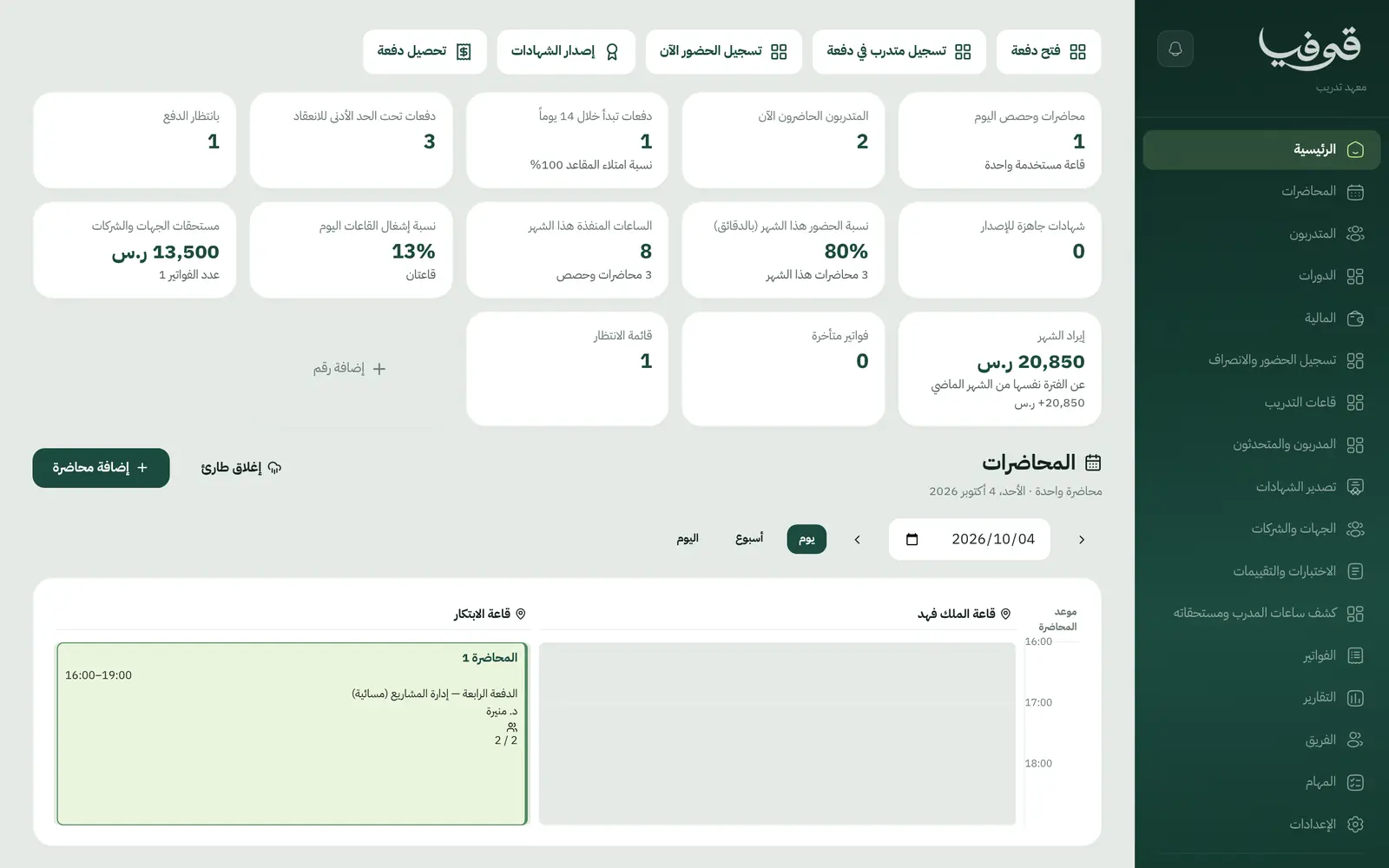
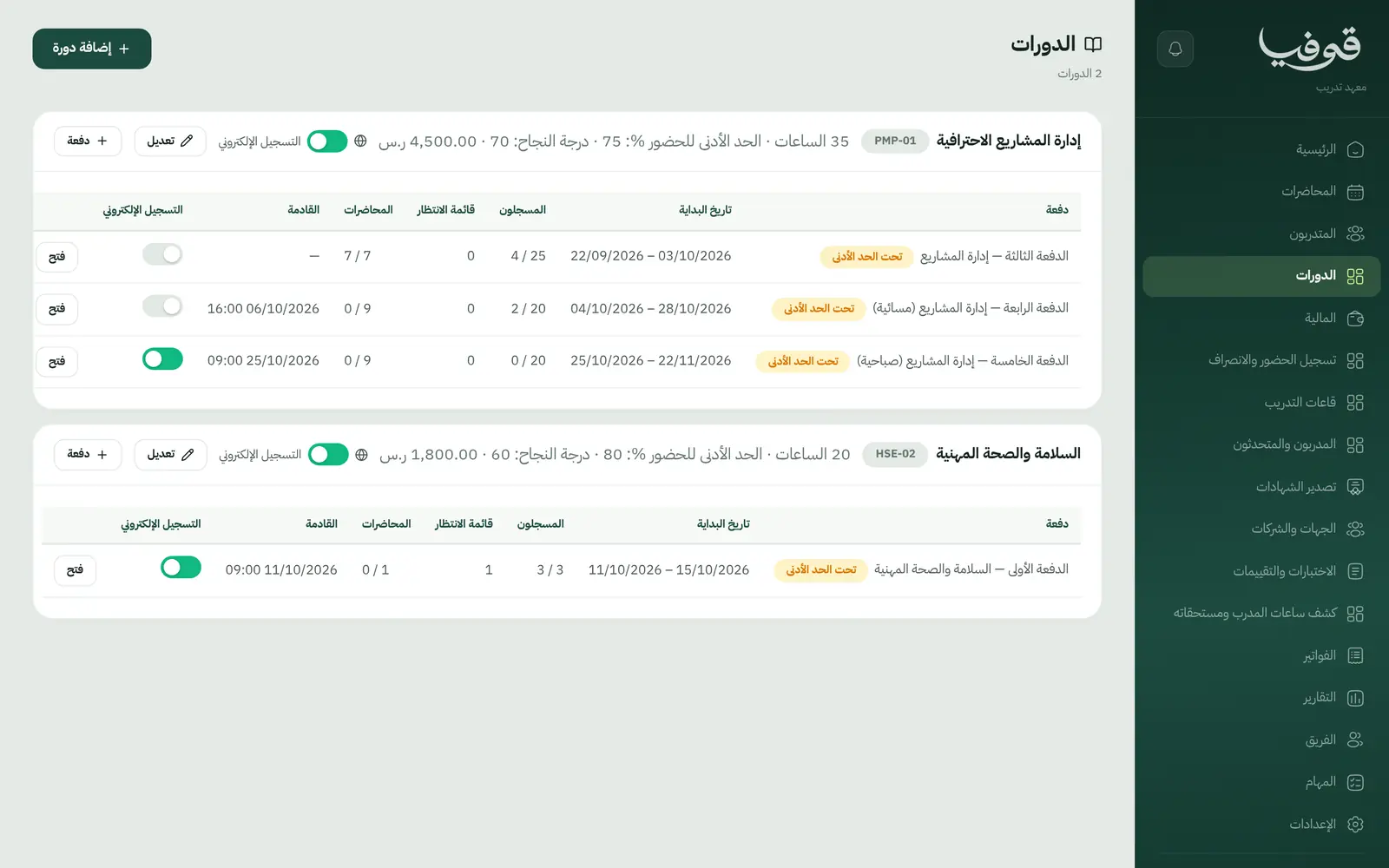
Each course has cohorts, and each cohort its lectures with a hall and a trainer, generated weekly from the timetable.
No clashing halls or trainers
A busy hall or trainer is refused by name, and a clash in any week refuses the whole series before a single lecture is booked.
Check-in and out by hall QR
Trainees scan a rotating QR code in the hall on the way in and out, or staff mark the roll, and attendance is counted in minutes.
Certificates for those who earn them
Eligibility comes from attendance and the final score; the bilingual certificate carries a QR verification link, and the professional classification number sits on the trainee’s file.
Export certificates in one go
A ZIP of every certificate as PDF plus an Excel register of names and numbers, ready for the employer or the archive.
Employers and sponsors
One tax invoice to the employer for all its trainees, and a swap from the employer’s list gives the substitute the same seat without billing it twice.
Enrol and pay on your page
Your courses appear on your public page; trainees enrol, confirm their phone and pay online, and land in the cohort.
Trainer hours and pay
Each trainer’s hours and pay from the lectures actually held, and a colleague who covered a lecture is paid for it.
Inside the system
How your day runs on Govia
Open the cohort
Pick the course, hall, trainer and days; lectures are generated and any clash is refused before saving.
Enrolment
Trainees enrol and pay on your page, or an employer enrols its staff on one invoice in its name.
Lecture day
Trainees scan the hall code in and out, and the dashboard shows who is here now and how full the halls are.
Course close
Scores are recorded, certificates go to those who met attendance and score, and you export them all as a ZIP with an Excel register.
Why Govia
Certificates that prove themselves
A verification link on every certificate saves you answering every employer who asks whether it is genuine.
Attendance by the minute
The percentage comes from scan-in and scan-out minutes, so certificate eligibility is clear and beyond argument.
Sponsors stay happy
One invoice in their name, a swapped trainee never billed twice, and both trainees told about the change.
Cover trainers are paid right
An absent trainer is covered for the period, the cohort is told once, and pay goes to whoever gave the lecture.
Arabic first, in your trade’s words
The whole system runs in Arabic, right to left, and names things the way your business does: client, patient, member or tenant.
Automatic WhatsApp messages
Booking confirmations, appointment reminders and verification codes reach your customers on WhatsApp without anyone typing them.
Local payments
Payment links with mada, Apple Pay and cards, plus instalments with Tabby and Tamara through Tap.
Tax invoices with QR
ZATCA-ready tax invoices with QR (generation phase), issued with every payment.
On Riyadh time
Appointments, reports and reminders run on Riyadh time and the Saudi working week, wherever the system is opened.
An assistant that answers and prepares
Ask it about your numbers and screens and it answers, then prepares the action for you to approve with one tap.
Questions before you start
Does it issue accredited certificates?
It issues bilingual certificates with a QR verification link, printing the course details, hours and accreditation you enter. Accrediting the course itself with the relevant authority remains yours.
Can trainees enrol and pay online?
Yes. Your courses appear on your public page; trainees enrol, confirm their phone with a WhatsApp code and pay with mada or Apple Pay once online payments are on.
Can I invoice a company for its staff?
Yes. «الجهات والشركات» issues one tax invoice to the company for its trainees, and the company can swap a trainee for another on its list without the seat being billed twice.
Are the invoices ZATCA-compliant?
Yes. Govia issues ZATCA-ready tax invoices with QR (generation phase), with your VAT number and VAT on every invoice.
Can I bring my data over from a notebook or Excel?
Yes. Enter records straight from the screens, our support team helps you move your data when you start, and any list exports to Excel whenever you want.
How long is the trial?
You start with a free trial from the sign-up page. Pick your business type and its screens and words are ready; the current trial length is shown on the pricing page.
Related businesses
Try Govia on your business
Sign up and start with a service menu and settings prepared for your trade, or book a demo and we will show you the system on your business.