Quran memorization center software that keeps every student’s record
Record daily recitation from the Quran index, let the memorization map build itself, test a completed juz and issue its certificate at once, and track fees and sponsors without notebooks.
Start your free trial Book a demo Pricing
What wears an owner down every day
The recitation book stays with the teacher
A student’s record lives in the teacher’s notebook, so when the teacher is away or changes, nobody knows where the student reached.
Tests before the juz is done
One student is put forward for a juz he hasn’t finished, while another finished his months ago and was forgotten.
Sponsors on scattered sheets
Who sponsors this student? The sponsor’s monthly claim and its attendance sheet are put together by hand every month.
What Govia gives you
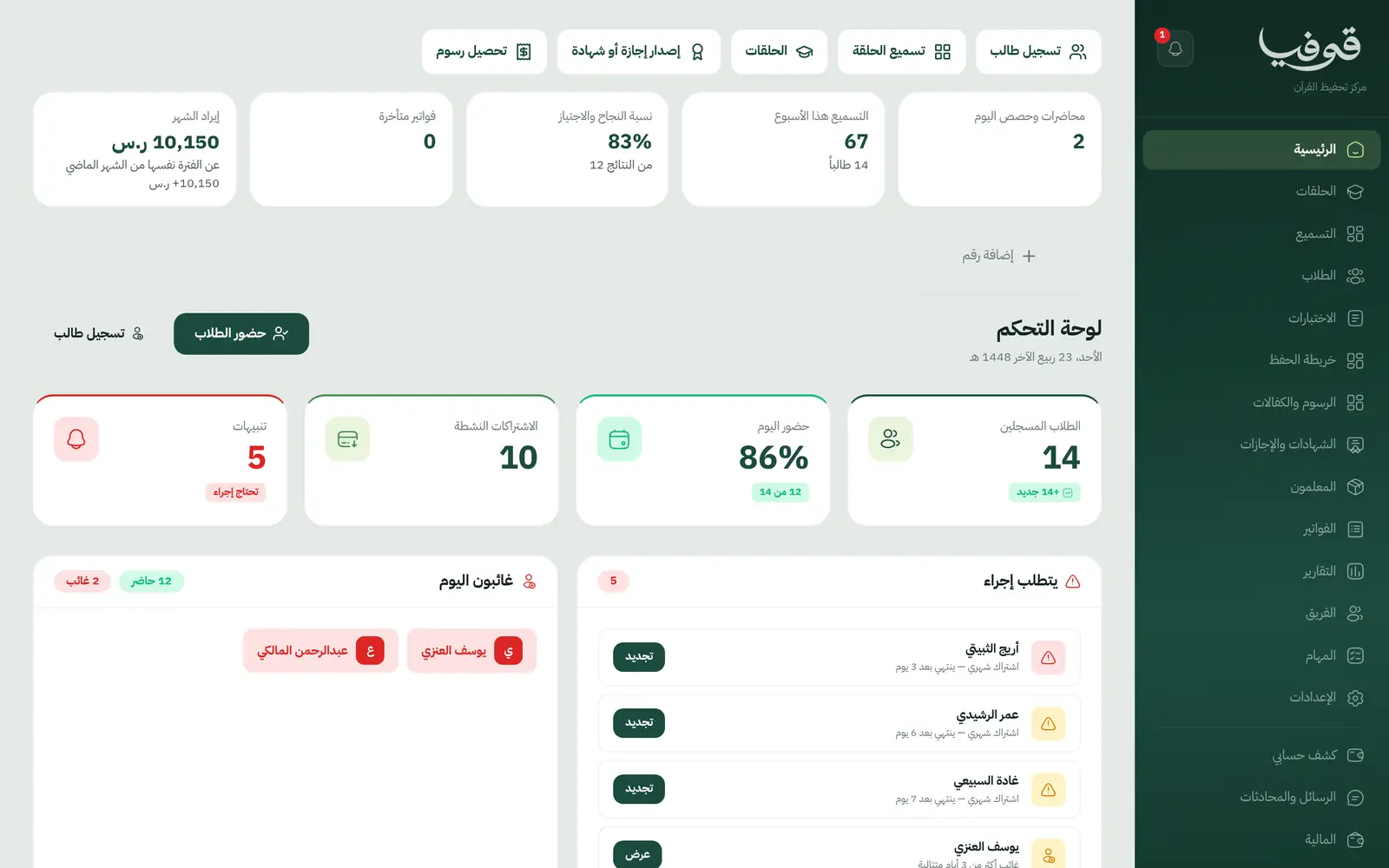
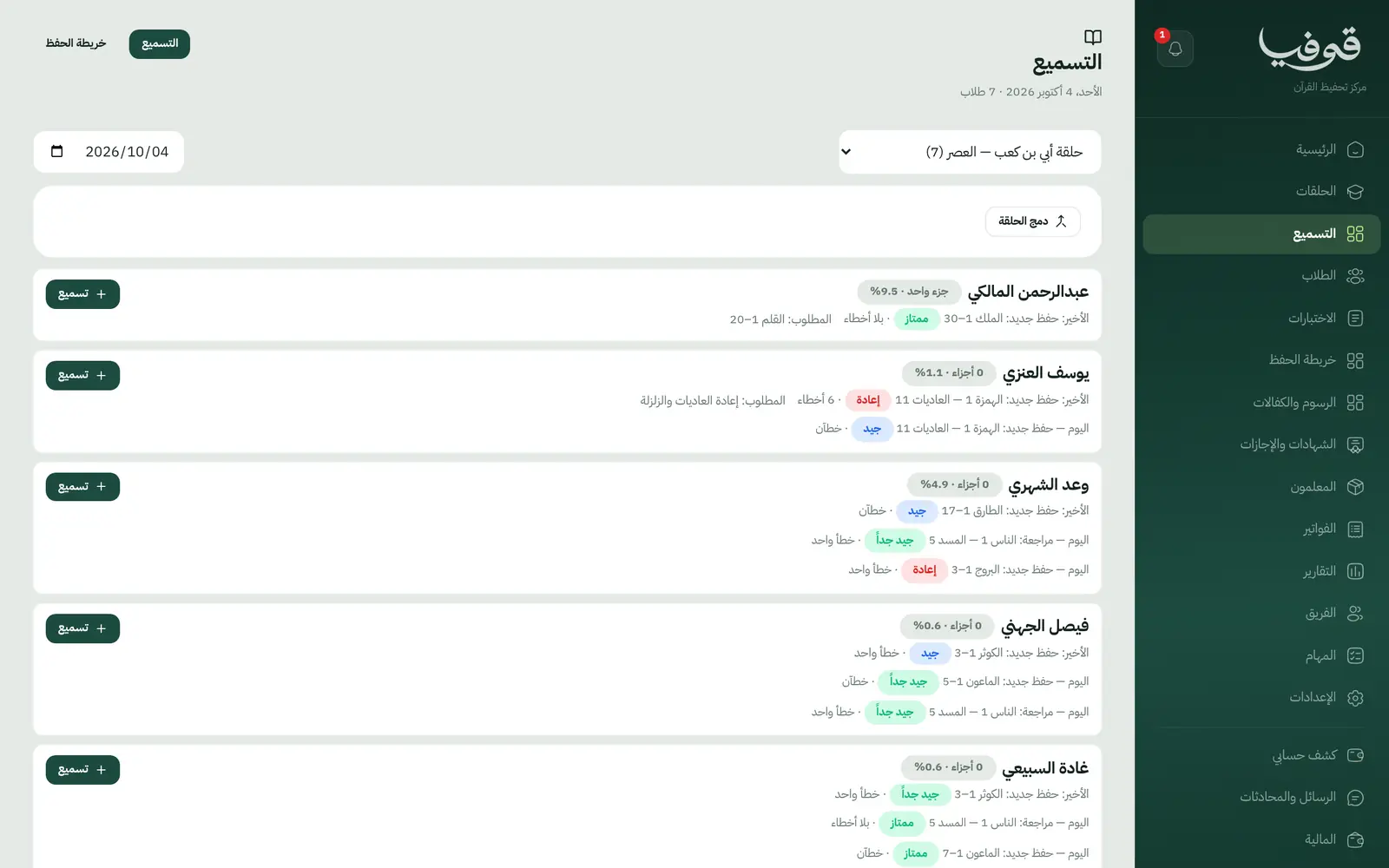
Daily recitation
«التسميع» lists the halaqa’s students, each one’s last recitation and tomorrow’s assignment, recorded by surah and ayah as new memorization or review, with a grade and mistakes.
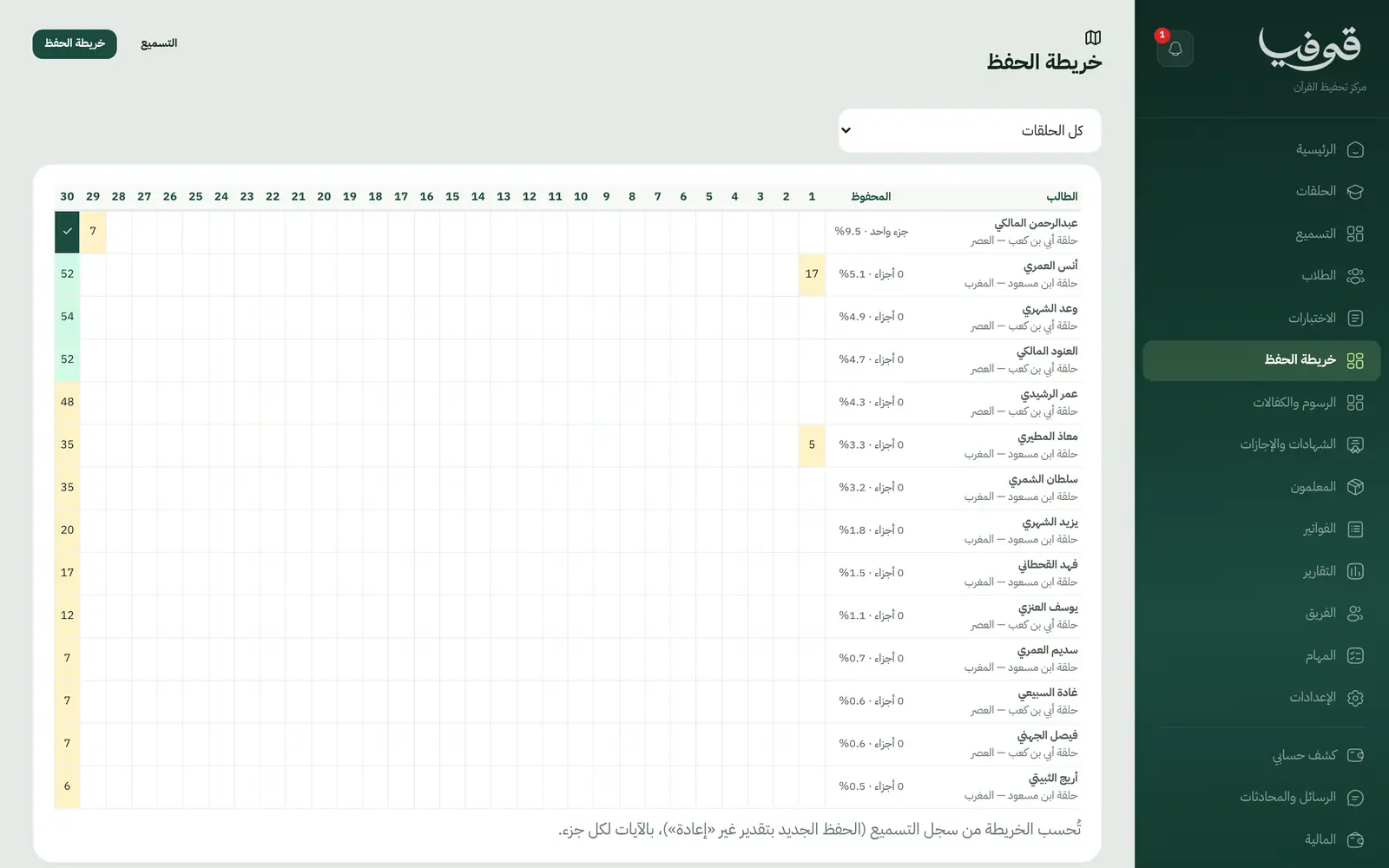
Memorization map
Built from the recitation record alone: how much of each juz a student holds, by ayah. Review and a «إعادة» grade never count as new memorization.
Juz tests
Shows the juz each student has fully memorized, and a juz that is incomplete in the record cannot be tested.
Juz and khatm certificates
Passing a test issues the juz certificate at once, with a verification link that shows no phone or ID; completing every juz issues the khatm certificate.
Fees and sponsors
Halaqa fees are monthly, a student can be linked to a sponsor and its amount, and each sponsor gets one monthly claim with the attendance sheet.
Merging halaqat in Ramadan
When a teacher is away for a while, the halaqa joins another from one date to another, each parent is told once, and students return on their own after the last day.
Parent portal
Parents follow their son’s recitation, halaqa and account from their phone.
Halaqat and teachers
Each halaqa has its teacher and capacity, and moving a student tells the parent the new halaqa, its teacher and the first session.
Inside the system
How your day runs on Govia
Before the halaqa
The teacher opens «التسميع» and sees each student’s last recitation and today’s portion.
During the halaqa
Memorization and review are recorded by surah, ayah and grade, with attendance on the roll.
A juz completed
The student appears under «الاختبارات», and passing issues the juz certificate with a verification link.
Month end
One claim per sponsor with the attendance sheet, and overdue invoices on the dashboard.
Why Govia
The record never gets lost
Recitation lives in the system, not the teacher’s notebook, so the record carries on if the teacher or halaqa changes.
Certificates anyone can check
Every juz and khatm certificate has a verification link, and a test opens only for a juz complete in the record.
Ramadan without the scramble
Merge halaqat with a start and end date, families are told once, and students return on time.
Late fees without awkwardness
An optional pause on late payment, which you switch on yourself, keeps the student’s place in the halaqa until they pay.
Arabic first, in your trade’s words
The whole system runs in Arabic, right to left, and names things the way your business does: client, patient, member or tenant.
Automatic WhatsApp messages
Booking confirmations, appointment reminders and verification codes reach your customers on WhatsApp without anyone typing them.
Local payments
Payment links with mada, Apple Pay and cards, plus instalments with Tabby and Tamara through Tap.
Tax invoices with QR
ZATCA-ready tax invoices with QR (generation phase), issued with every payment.
On Riyadh time
Appointments, reports and reminders run on Riyadh time and the Saudi working week, wherever the system is opened.
An assistant that answers and prepares
Ask it about your numbers and screens and it answers, then prepares the action for you to approve with one tap.
Questions before you start
How is recitation recorded?
From «التسميع»: pick the surah and ayah from the Quran index, new memorization or review, with the grade, mistakes and tomorrow’s portion, and the memorization map updates itself.
Can parents see their son’s recitation?
Yes. The parent portal shows recitation, the halaqa and the account, and parents are told when their son moves halaqa or his halaqa is merged.
Do I need to install anything?
No. Govia runs in the browser on a phone, tablet or computer, and you start the moment your account exists, with no hardware and nothing to install.
Can I bring my data over from a notebook or Excel?
Yes. Enter records straight from the screens, our support team helps you move your data when you start, and any list exports to Excel whenever you want.
Does it send WhatsApp reminders?
Yes, automatic WhatsApp messages: a reminder the day before, and a notice when a time, a teacher or a place changes, each sent once and controlled from your notification settings.
How long is the trial?
You start with a free trial from the sign-up page. Pick your business type and its screens and words are ready; the current trial length is shown on the pricing page.
Related businesses
Try Govia on your business
Sign up and start with a service menu and settings prepared for your trade, or book a demo and we will show you the system on your business.