Tutoring center software that counts the minutes for you
Sell packages in minutes, book one-to-one lessons or a whole weekly series, let every lesson draw on the balance and send its note to the parent, and have tutor pay ready at month end.
Start your free trial Book a demo Pricing
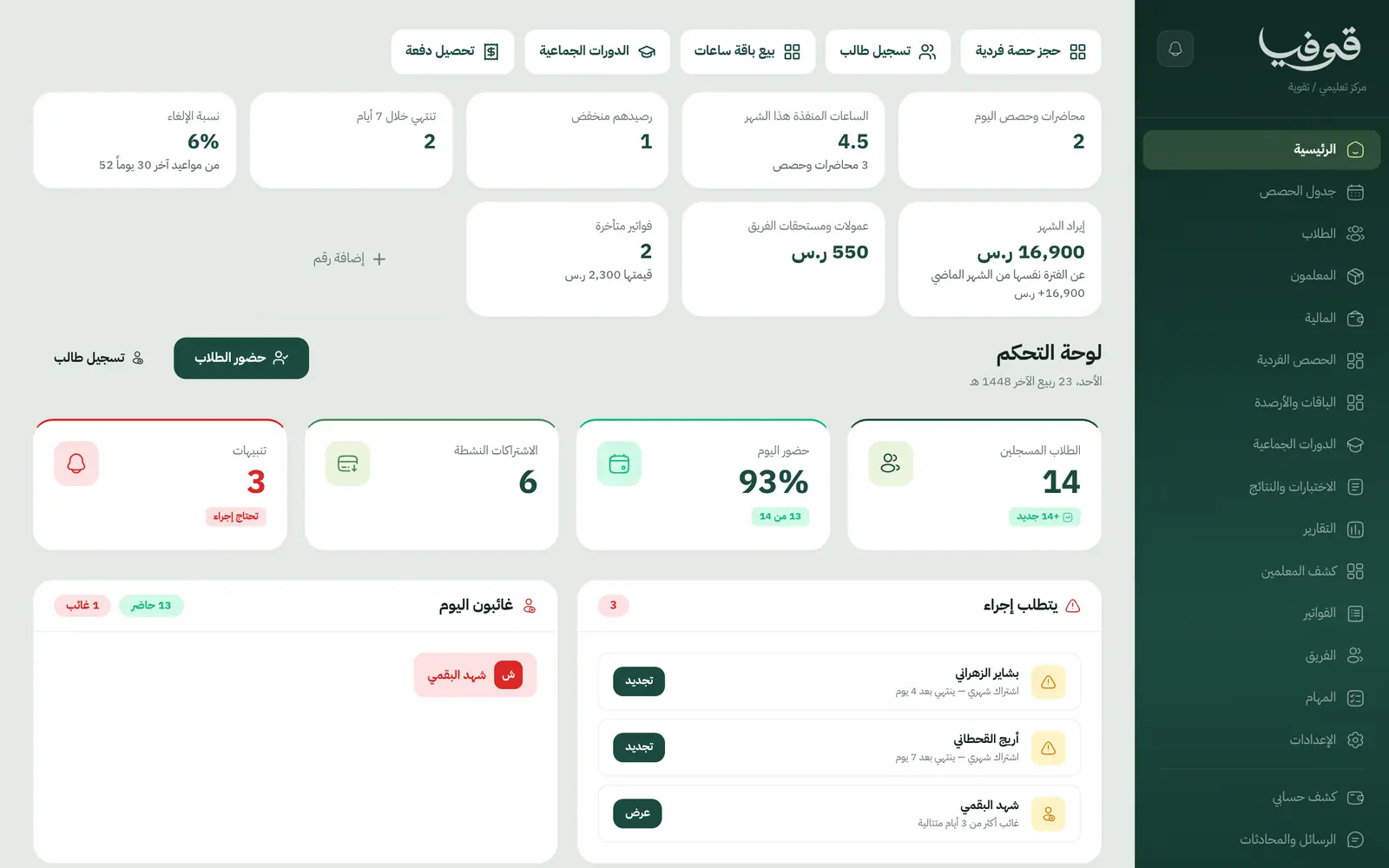
What wears an owner down every day
Lesson balances in a notebook
How much is left on a student’s package? You piece it together from WhatsApp and the tutor’s notebook, and argue it with the parent every month.
No rule for no-shows
One student skips without notice, another cancels the day before, and each case is settled by goodwill at the center’s expense.
Tutor pay by guesswork
At month end you count each tutor’s lessons from the timetable, and a tutor comes back about the one you missed.
What Govia gives you
Packages in minutes
Each one-to-one lesson draws its length from the package, and a lesson longer than the remaining balance cannot be booked.
Weekly series in one go
Choose “weekly for …”, preview every week and the balance left, then book the whole series. Cancel the rest of a series whenever you need to.
No-shows count, cancellations don’t
A missed lesson is drawn from the package and a timely cancellation is not, under the cancellation policy you set.
A lesson note for parents
Each lesson closes with the tutor’s note, which the parent reads in their portal alongside lessons and invoices.
Freeze, extend, transfer
Freeze with a reason, extend, move the remaining minutes to another student, and renew with unused minutes carried over.
A tutor away for a week
Their lessons go to colleagues at the same times, or wait for families who prefer to, with the package extended; parents hear about every lesson that changed.
Tutor statement
Each tutor’s pay from minutes actually delivered at a rate per minute, hour or lesson, locked in with «تسجيل مستحقات الشهر».
Group courses and exams
Group courses with their timetable and exam results, run alongside one-to-one lessons in the same center.
Inside the system
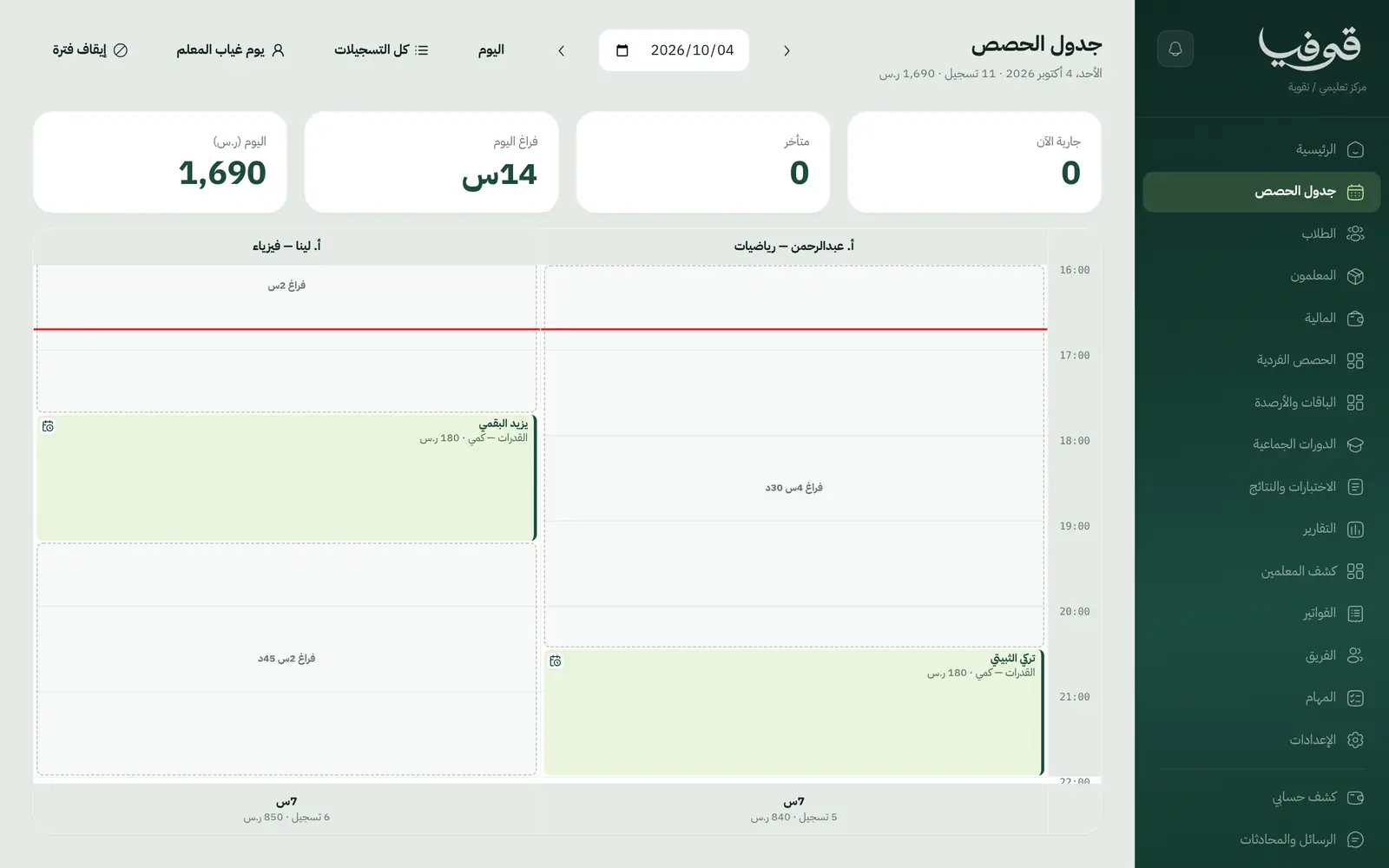
How your day runs on Govia
Register the student
The student’s file with their parent, and a minute package sold with its invoice.
Book lessons
A single lesson or a weekly series, drawn from the balance with the tutor held for the slot.
After the lesson
It closes with a note the parent can read, and a no-show is counted under your policy.
Month end
The tutor statement adds up delivered minutes, and the dashboard flags low balances and packages ending within 7 days.
Why Govia
A balance nobody disputes
Every minute drawn is tied to its lesson, and parents see lessons and notes in their portal.
Stopping a package tells everyone
Stopping a package cancels the lessons ahead and tells the tutor and the family once.
Fair pay for tutors
Pay comes from lessons actually delivered, and a tutor who covered a colleague’s lesson is paid for it.
Packages move on their own
A package’s stage updates by itself as minutes run low or run out, so you know whom to call about renewing.
Arabic first, in your trade’s words
The whole system runs in Arabic, right to left, and names things the way your business does: client, patient, member or tenant.
Automatic WhatsApp messages
Booking confirmations, appointment reminders and verification codes reach your customers on WhatsApp without anyone typing them.
Local payments
Payment links with mada, Apple Pay and cards, plus instalments with Tabby and Tamara through Tap.
Tax invoices with QR
ZATCA-ready tax invoices with QR (generation phase), issued with every payment.
On Riyadh time
Appointments, reports and reminders run on Riyadh time and the Saudi working week, wherever the system is opened.
An assistant that answers and prepares
Ask it about your numbers and screens and it answers, then prepares the action for you to approve with one tap.
Questions before you start
Can I sell packages by the hour?
Yes. Packages are counted in minutes, so you sell whatever number of hours you like, each lesson draws its actual length, and the student and parent see what is left.
How is tutor pay worked out?
The tutor statement takes each tutor’s minutes delivered in the month at their rate per minute, hour or lesson, and «تسجيل مستحقات الشهر» locks it so a later rate change doesn’t rewrite it.
Does it send WhatsApp reminders?
Yes, automatic WhatsApp messages: a reminder the day before, and a notice when a time, a teacher or a place changes, each sent once and controlled from your notification settings.
Do you support mada and Apple Pay?
Yes. Once online payments are switched on in settings, customers pay with mada, Visa, Mastercard or Apple Pay, and Tabby and Tamara are available through the Tap gateway.
Are the invoices ZATCA-compliant?
Yes. Govia issues ZATCA-ready tax invoices with QR (generation phase), with your VAT number and VAT on every invoice.
How long is the trial?
You start with a free trial from the sign-up page. Pick your business type and its screens and words are ready; the current trial length is shown on the pricing page.
Related businesses
Try Govia on your business
Sign up and start with a service menu and settings prepared for your trade, or book a demo and we will show you the system on your business.