Equestrian centre software that books trainer and horse together
A lesson books the trainer and the horse in one step, a horse past its daily cap cannot be booked, the rider's pack is drawn with each lesson, and client horses are kept on a stall contract.
Coming soon — We are building this business's own tools now, and we do not want to hand you a dashboard that does not fit. Book a demo and we will set it up with you.
What wears an owner down every day
Overworked horses
The same horse in five lessons in a row because nobody counts its working minutes.
A trainer without a horse
The lesson is booked on the trainer while the horse is with someone else.
Livery from memory
Who paid stable fees this month, and when did the vet last see the client's horse?
What Govia gives you
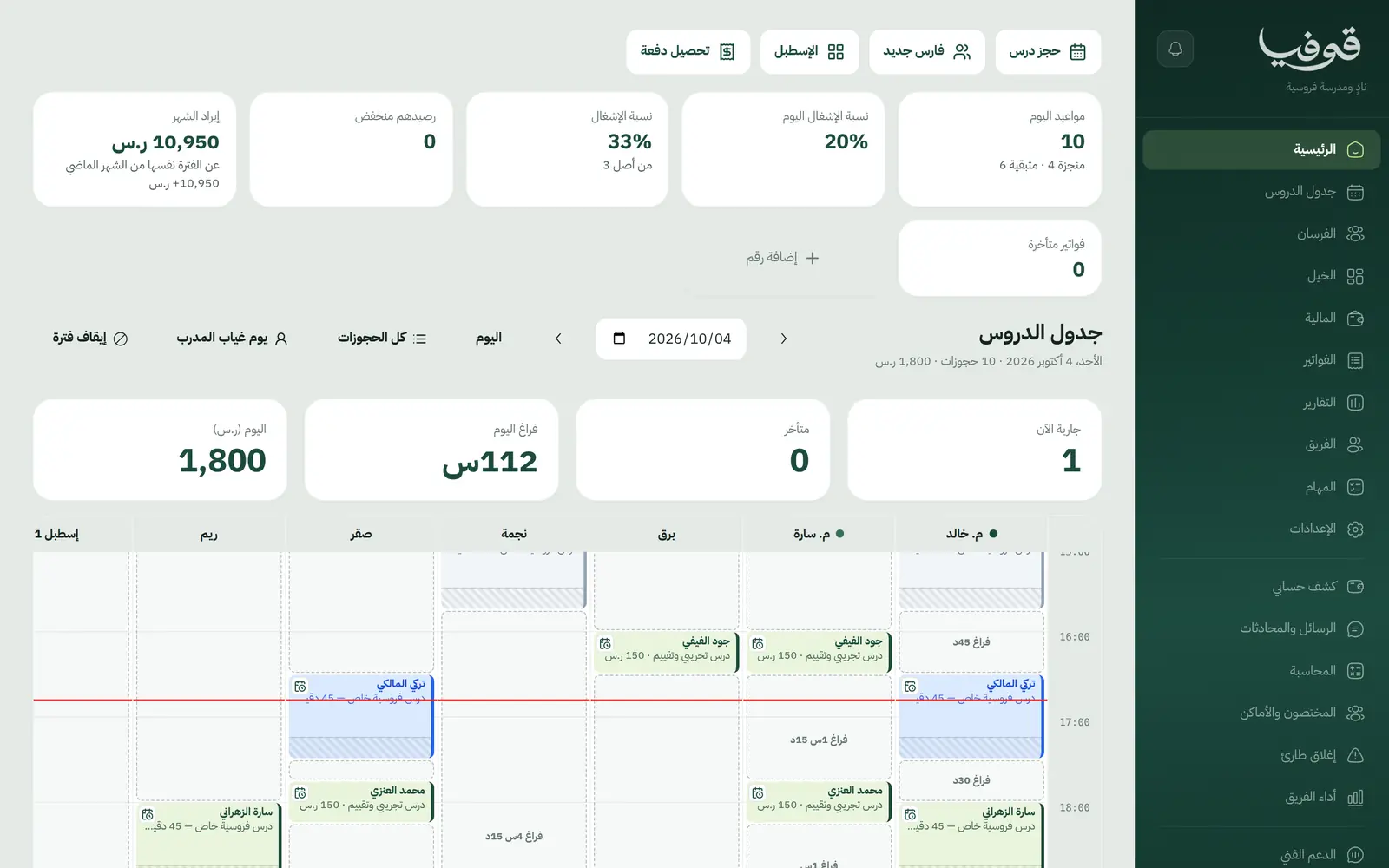
Lesson timetable
A lesson holds trainer and horse together, and if either is busy the whole lesson is refused.
Daily cap per horse
Working minutes per horse per day, and an extra lesson is refused by the horse's name.
Lesson packs
A lesson pack with its balance, drawn with each lesson.
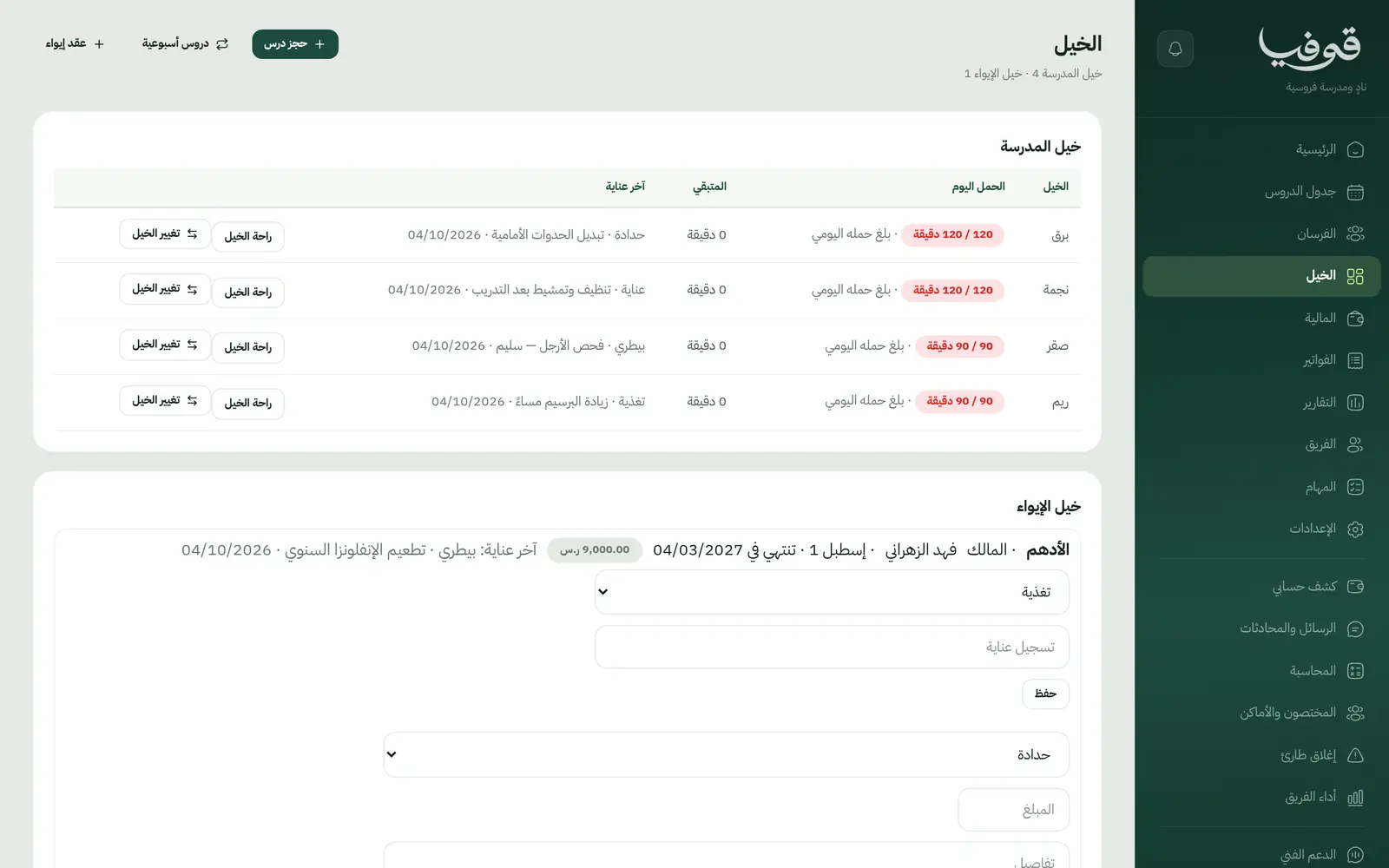
Owned horses and livery
Client horses on their files, and a livery contract that holds the stall with its fee.
Care log
Feed, farrier, vet and turnout recorded on each horse.
Swap a horse
Swap the horse on a single lesson from the stable screen.
Rider file
Level, weight, helmet size and waivers.
Documents
Level certificate, livery contract, membership card, health record and tax invoice.
Inside the system
How your day runs on Govia
The pack
The rider buys a lesson pack or a trial lesson and assessment.
Booking
Trainer and horse are held together, and a horse at its cap cannot be booked.
The lesson
Drawn from the pack, with level progress on the rider's file.
Livery
The stall contract with its monthly fee, and care logged on the horse.
Why Govia
Horses protected by numbers
The daily cap is checked on every booking.
No timetable clashes
Trainer and horse are booked in one step.
Livery in the same system
Contract, stall, care and invoice together.
Booking from your link
Riders book lessons online and confirm with a WhatsApp code.
Arabic first, in your trade’s words
The whole system runs in Arabic, right to left, and names things the way your business does: client, patient, member or tenant.
Automatic WhatsApp messages
Booking confirmations, appointment reminders and verification codes reach your customers on WhatsApp without anyone typing them.
Local payments
Payment links with mada, Apple Pay and cards, plus instalments with Tabby and Tamara through Tap.
Tax invoices with QR
ZATCA-ready tax invoices with QR (generation phase), issued with every payment.
On Riyadh time
Appointments, reports and reminders run on Riyadh time and the Saudi working week, wherever the system is opened.
An assistant that answers and prepares
Ask it about your numbers and screens and it answers, then prepares the action for you to approve with one tap.
Questions before you start
Does it stop horses being overworked?
Set each horse's daily working minutes, and a lesson that would exceed them is refused, naming the horse and how much of its cap is used.
Does it manage livery for client horses?
Yes. The client's horse is on their file, the livery contract holds the stall with its fee, and care is logged on the horse.
Can I sell lesson packs?
Yes. A lesson pack with its balance is drawn with each lesson, and the balance shows on the rider's file.
Do you support mada and Apple Pay?
Yes. Online payment takes mada, Apple Pay and cards, and with the Tap gateway Tabby and Tamara instalments are available too. At the desk you record cash and card on the drawer.
Are the invoices ZATCA compliant?
Yes. Invoices are ZATCA-ready tax invoices with QR (generation phase), issued automatically with every payment.
Does it need installing?
No. It runs in the browser on phone, tablet and computer, and can be added as an app from our install page with no app store. Updates arrive on their own.
Related businesses
Try Govia on your business
Book a demo and we will show you Govia on your business, and set it up with you when it launches.