Gym management software that starts at the gate
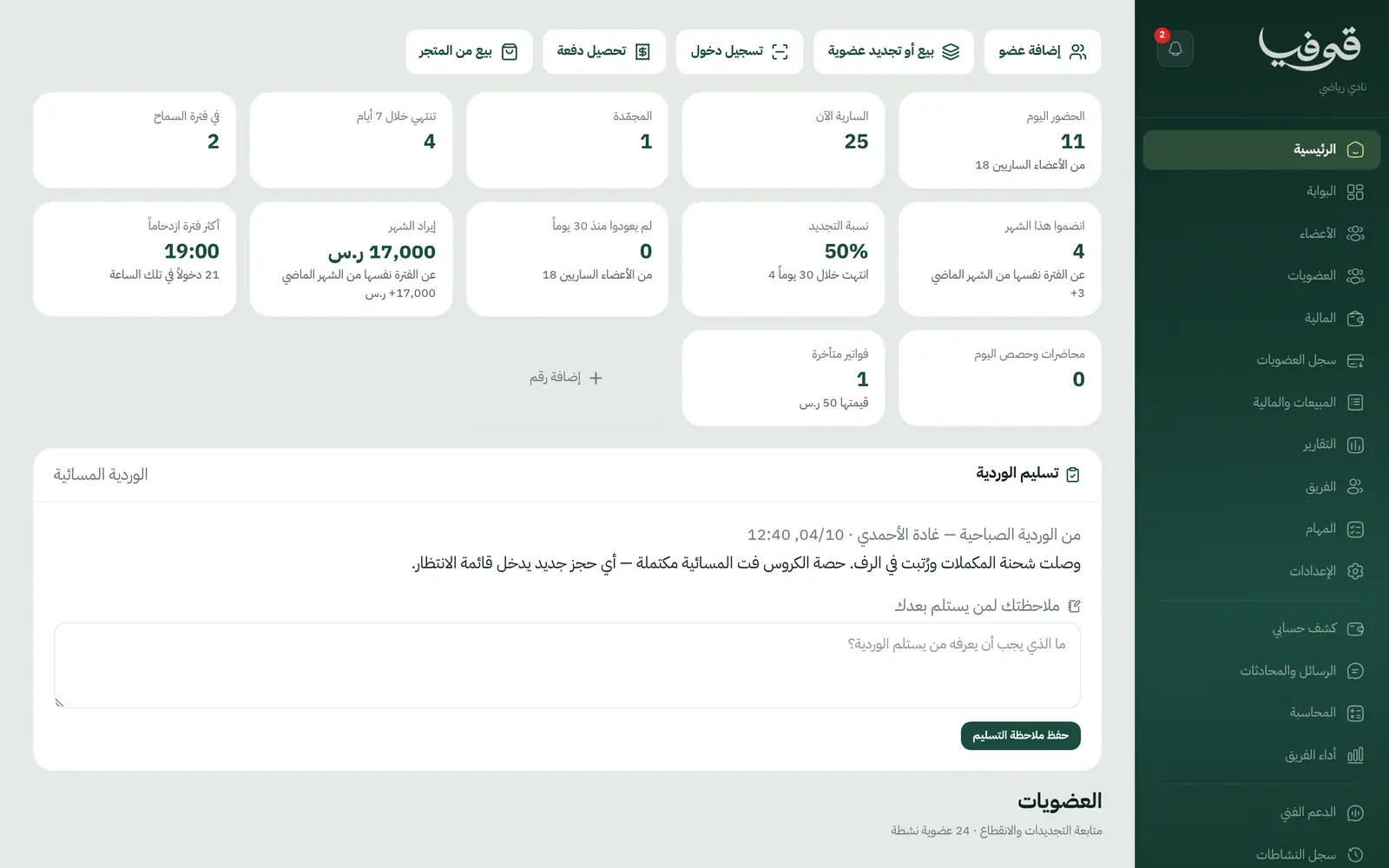
Members enter with a QR code that changes every 30 seconds, every refusal says why, a freeze pushes the end date out, and the renewal board shows who ends this week before they walk away.
Coming soon — We are building this business's own tools now, and we do not want to hand you a dashboard that does not fit. Book a demo and we will set it up with you.
What wears an owner down every day
Uncontrolled entry
An expired member walks in, and a photo of a card is passed between friends.
Freezes on favours
A freeze is written in a notebook, and nobody knows how many days are left or when the membership really ends.
Missed renewals
The membership ended two weeks ago and nobody called.
What Govia gives you
Gate
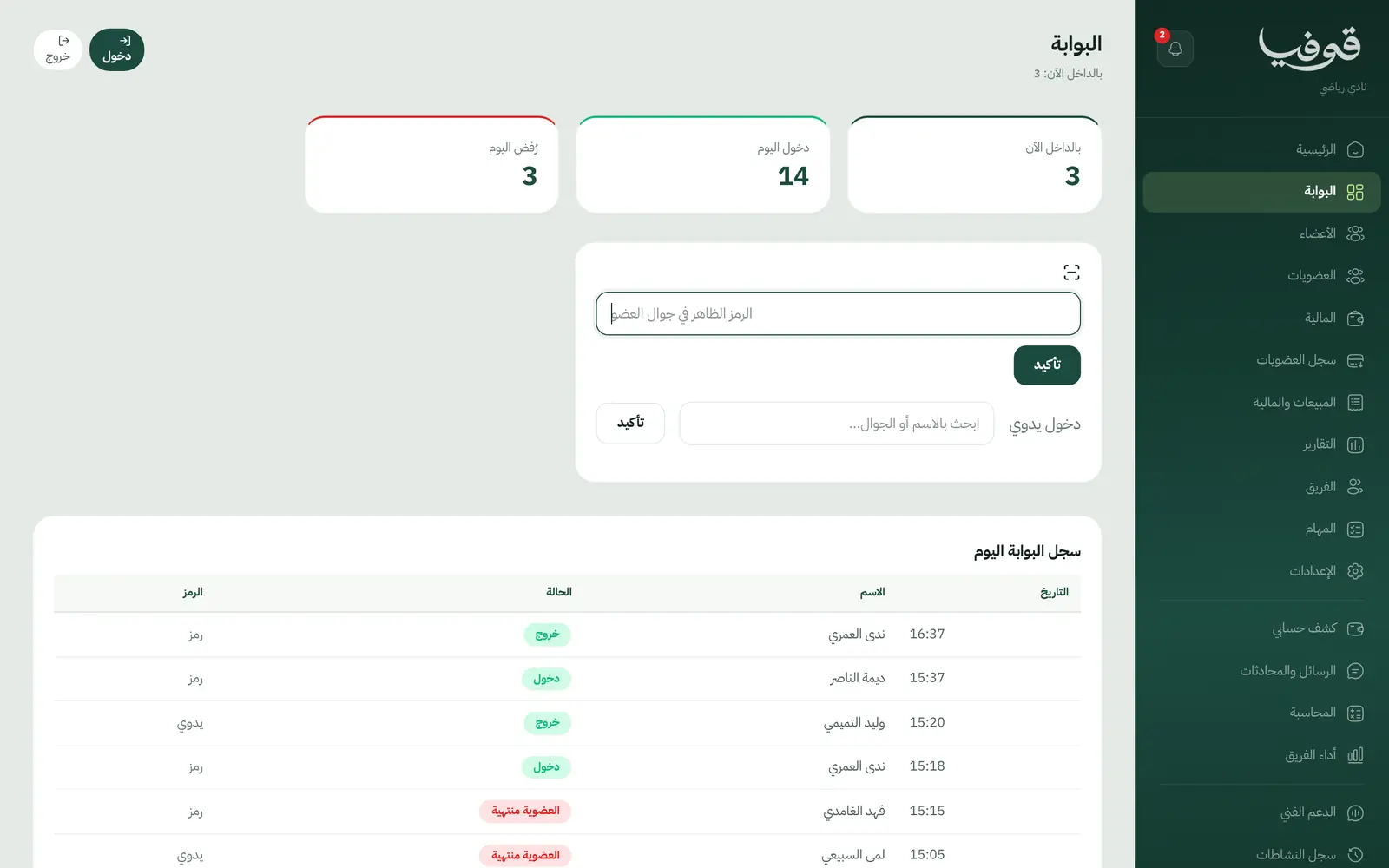
A personal QR code that changes every 30 seconds, every entry attempt logged, and each refusal states its reason.
Freezes
Freeze days with a minimum, a maximum and a fee if you want one; the end date moves out by the days frozen.
Guest passes
A number of guests per membership month, with a guest waiver.
Auto-renewal
The next period's invoice is raised before the end, with a grace period you set.
Renewal board
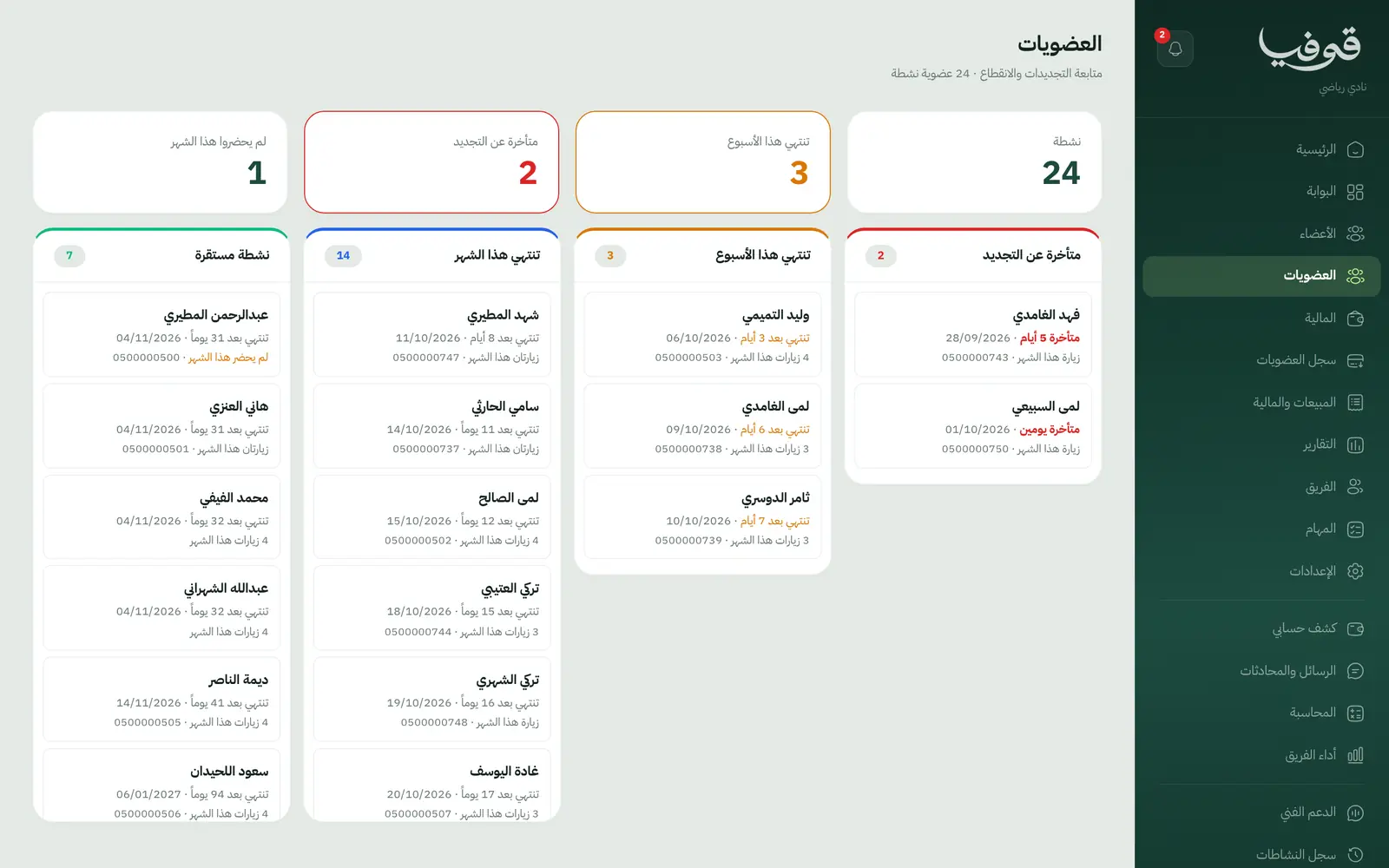
Four lanes: expired, this week, this month, settled.
Upgrades, transfers and packs
Pro-rata upgrades, membership transfers with a fee, and a PT pack sold alongside the membership.
Peak hours
Today's entries and peak hours on the home screen, from the gate log.
Shop and invoices
Sell from the shop, simplified tax invoices with QR, receipts, statements and membership cards.
Inside the system
How your day runs on Govia
Joining
Add the member and pick the membership; the invoice goes out with a payment link.
At the gate
The member shows their code from the portal, and the scan admits or refuses with a reason.
During the membership
Freeze, guest, upgrade or PT pack, all from the member's file.
Before it ends
A WhatsApp reminder, then renewal, a grace period or expiry.
Why Govia
A gate that is hard to fool
The code changes every 30 seconds, so a screenshot does not open the door.
Clear freeze rules
Allowed days, limits and fees come from the membership's settings.
Renewals in front of you
Everyone ending this week on one board.
Cancellation by policy
A cancellation runs through your policy and settles the money and the next term together.
Arabic first, in your trade’s words
The whole system runs in Arabic, right to left, and names things the way your business does: client, patient, member or tenant.
Automatic WhatsApp messages
Booking confirmations, appointment reminders and verification codes reach your customers on WhatsApp without anyone typing them.
Local payments
Payment links with mada, Apple Pay and cards, plus instalments with Tabby and Tamara through Tap.
Tax invoices with QR
ZATCA-ready tax invoices with QR (generation phase), issued with every payment.
On Riyadh time
Appointments, reports and reminders run on Riyadh time and the Saudi working week, wherever the system is opened.
An assistant that answers and prepares
Ask it about your numbers and screens and it answers, then prepares the action for you to approve with one tap.
Questions before you start
How do members get in?
Members open their portal with their mobile number and show a QR code that changes every 30 seconds; staff scan it from the gate screen. A refusal shows its reason, such as expired or frozen.
Can I freeze a membership?
Yes. Set allowed freeze days, the minimum and maximum, and any fee; the end date moves out by the days frozen.
Does it send WhatsApp reminders?
Yes. Automatic WhatsApp messages: a reminder 24 hours before a booking, and a renewal reminder on the days you choose before a membership ends.
Do you support mada and Apple Pay?
Yes. Online payment takes mada, Apple Pay and cards, and with the Tap gateway Tabby and Tamara instalments are available too. At the desk you record cash and card on the drawer.
Are the invoices ZATCA compliant?
Yes. Invoices are ZATCA-ready tax invoices with QR (generation phase), issued automatically with every payment.
Can I move my members from a notebook or Excel?
You add members from the members screen, a file is created with each first booking or sign-up from your link, and setup prepares your memberships and prices on day one. There is no automatic Excel import today.
Related businesses
Try Govia on your business
Book a demo and we will show you Govia on your business, and set it up with you when it launches.