Home services software from request to the client's door
Clients book with their address and map pin, and see their district's fee before confirming. Your team presses «في الطريق» and the client is told, arrival is checked at the pin, and payment is taken at the door.
Coming soon — We are building this business's own tools now, and we do not want to hand you a dashboard that does not fit. Book a demo and we will set it up with you.
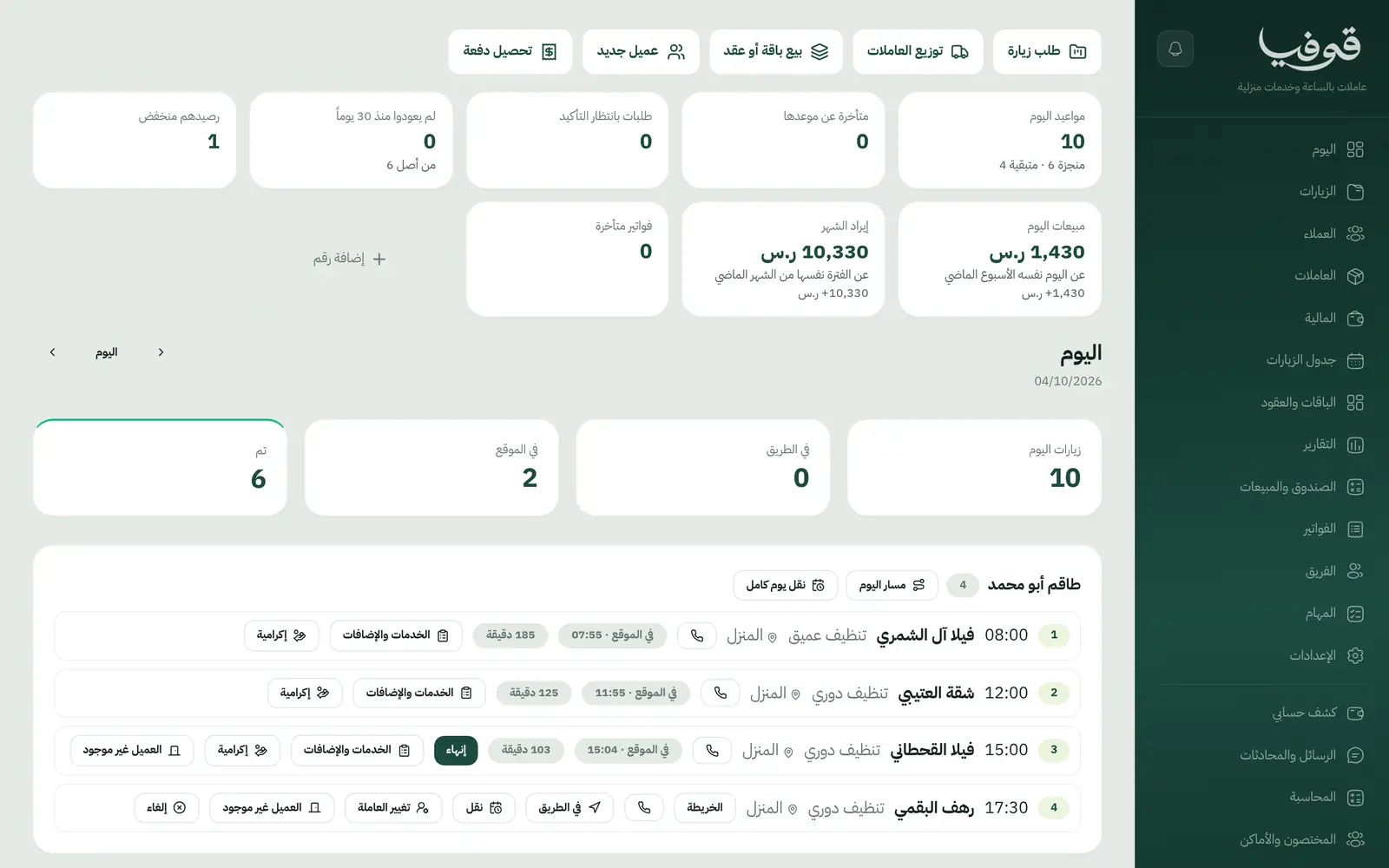
Govia is home services software for hourly home-help offices and monthly maid contracts, and for home beauty artists and mobile salons. It runs on a day board that assigns visits to your team and follows each one from «on the way» to arrival, finish and payment. Deep cleaning and pest control have their own pages under Maintenance and Cleaning.
Pick your business
Hourly Home Help
Visit packages and monthly contracts that create their visits every week, a day board to assign workers, an «on the way» message to the client, arrival checked at the home's pin, and minutes on site counted.
Home Beauty
Clients book with their address and pay the deposit, and the artist presses «on the way» so the client is told. At the door: service, add-ons and products on one invoice with the tip, and the commission worked out.
Deep Cleaning & Sanitising
Maintenance & Cleaning
Pest Control
Maintenance & Cleaning
Why Govia
Booking by address and district
The client sets an address and pin, the district's travel fee is added before confirming, and a booking from a district you do not serve arrives as a request you accept or decline.
A day board for the supervisor
Move a visit, change who goes, mark nobody home, cancel, or move a worker's whole day, with a preview first.
Know where your team is
An «on the way» message with the expected arrival time, arrival checked against the home's pin, minutes on site counted, and a map link for the day's route.
Cash at the door, accounted for
Cash taken goes into the custody of whoever took it and is handed in at the drawer, the rest goes by pay link, with ZATCA-ready tax invoices with QR (generation phase).
Arabic first, in your trade’s words
The whole system runs in Arabic, right to left, and names things the way your business does: client, patient, member or tenant.
Automatic WhatsApp messages
Booking confirmations, appointment reminders and verification codes reach your customers on WhatsApp without anyone typing them.
Local payments
Payment links with mada, Apple Pay and cards, plus instalments with Tabby and Tamara through Tap.
Tax invoices with QR
ZATCA-ready tax invoices with QR (generation phase), issued with every payment.
On Riyadh time
Appointments, reports and reminders run on Riyadh time and the Saudi working week, wherever the system is opened.
An assistant that answers and prepares
Ask it about your numbers and screens and it answers, then prepares the action for you to approve with one tap.
Questions before you start
Do I need to install anything?
No. It runs in the browser on a phone, an iPad or a computer: the supervisor runs the day from the office and your team presses «on the way» and «arrived» on their phones.
Can I set the districts I serve and a fee for each?
Yes. Add districts and a travel fee per district, shown to the client before confirming. If you limit bookings to your districts, a booking from elsewhere arrives as a request you accept or decline, and the client is told either way.
Do you support mada and Apple Pay?
Yes. Deposits and invoices are paid through a secure link with mada, cards and Apple Pay depending on what the payment gateway enables; with Tap, Tabby and Tamara are available too. At the door you take cash or send the pay link.
Does it send WhatsApp reminders?
Yes, automatic WhatsApp messages: the booking confirmation, a reminder the day before, and «on the way» with the expected arrival time when your team sets off.
Are the invoices ZATCA-compliant?
Every visit closes with a ZATCA-ready tax invoice with QR (generation phase).
How long is the trial?
The free trial starts from the sign-up page and opens straight on your trade's screens. If you would rather see the day board on your own business first, book a demo.
Solutions for other businesses
- Salons & Spas
- Car Wash & Detailing
- Sports Clubs
- Studios
- Tourism & Trips
- Veterinary & Pet Care
- Training & Education
- Maintenance & Cleaning
- Entertainment & Events
- Consulting & Advisory
- Technical Installation
- Healthcare
- Restaurants & Cafés
- Facilities & Property Management
- Chalets & Rest Houses
- Business Spaces
- Nurseries & Kindergartens
Try Govia on your business
Book a demo and we will show you Govia on your business, and set it up with you when it launches.